Showing posts with label HACKS. Show all posts

Thursday, November 27, 2014

CCleaner v5.00.5050 + All Editions


Description:


CCleaner is the number-one tool for cleaning your Windows PC. It protects your privacy online and makes your computer faster and more secure. .CCleaner is our system optimization, privacy and cleaning tool. It removes unused files from your system - allowing Windows to run faster and freeing up valuable hard disk space. It also cleans traces of your online activities such as your Internet history. Additionally it contains a fully featured registry cleaner. But the best part is that it's fast (normally taking less than a second to run) 

It can clean:


Internet Explorer:
Temporary files, history, cookies, super cookies, Autocomplete form history, index.dat files.

Firefox:
Temporary files, history, cookies, super cookies, download history, form history.

Google Chrome:
Temporary files, history, cookies, super cookies, download history, form history.

Opera:
Temporary files, history, cookies, super cookies, download history.

Apple Safari:
Temporary files, history, cookies, super cookies, form history.

Other Supported Browsers:
K-Meleon, Rockmelt, Flock, Google Chrome Canary, Chromium, SeaMonkey, Chrome Plus, SRWare Iron, Pale Moon, Phoenix, Netscape Navigator, Avant and Maxthon.

Windows:
Recycle Bin, Recent Documents, Temporary files, Log files, Clipboard, DNS Cache, Error Reporting, Memory Dumps, Jump Lists.

Registry Cleaner:
Advanced features to remove unused and old entries, including File Extensions, ActiveX Controls, ClassIDs, ProgIDs, Uninstallers, Shared DLLs, Fonts, Help Files, Application Paths, Icons, Invalid Shortcuts and more...

Third-party applications:
Removes temp files and recent file lists (MRUs) from many apps including Windows Media Player, eMule, Google Toolbar, Microsoft Office, Nero, Adobe Acrobat, WinRAR, WinAce, WinZip and many more...


What's New in version 5.00.5050: 


v5.00.5050 (25 Nov 2014)
- New improved GUI.
- Improved internal architecture for better performance.
- Added Google Chrome plugin management.
- Improved Google Chrome Startup item detection.
- Optimized automatic updates for Pro version.
- Improved system restore detection routine. 
- Updated exception handling and reporting architecture.
- Optimized 64-bit builds on Windows 8, 8.1 and 10.
- Updated various translations. 
- Many performance improvements and bug fixes.


DOWNLOAD : CLICK HERE

Saturday, November 22, 2014

How To Hack Wifi Password

How To Hack Wifi Password


If you are living nearby someones WiFi hotspot and every time your laptop search for connection its showing up but you don't have passwords. Or you just want to steal someones WPA/WPA2 Wi-Fi hotspots key or passwords. Don't worry...


 I’ll show How to hack a WPA/WPA2 Wi-Fi connection through a bootable USB.

THINGS YOU WILL NEED -

1.A USB pen drive
2.beini.iso file. Download beini.iso  OR Click here 
3.UNetbootin software to make your USB drive bootable. Download UnetBootin for Windows, Mac or Linux

Some few steps you would have to do (WEP)

1. Write beini.iso on your USB by UNetbootin. Set everything according to this image below.


a
2. After finishing restart your PC and boot it from your USB.
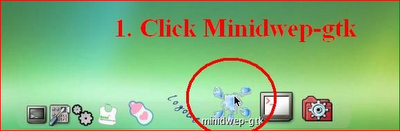
3. If you were successful to boot up then you should see something like this. Click Minidwep-gtk.

a


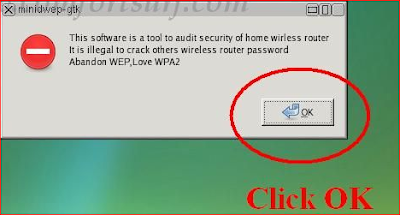
4. Click OK.

a

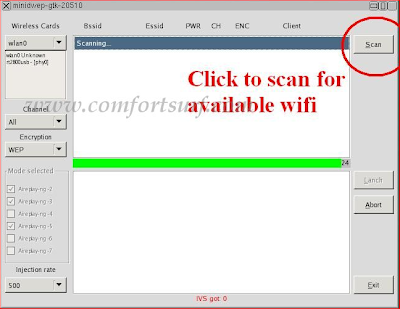
5. Now Minipwep-gtk program will open. Click Scan.

a

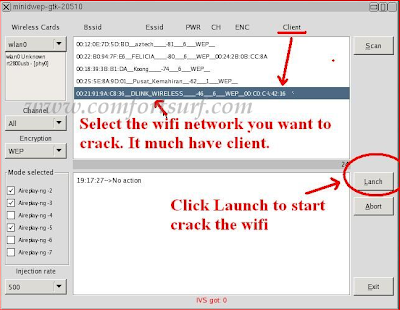
6. Select a wireless network(should have Client) from the list. And click Launch to start cracking process.

a


7. Sometimes it take a while according to your victim connections, IVS value and password strength. So keep patience.


a


8. If it finds a password, it should appear like this.

a

To crack WPA/WPA2 follow this image instruction.

RESTART YOUR PC AND BOOT FROM YOUR OS THEN ENTER THE FOUND PASSWORD.


THANK YOU 


Tuesday, November 18, 2014

How To Lock Any Folder With Password Without Software

Hai Guys Today i will show you how to lock any Folder with Password without Using Any Software To Secure your files

HOW TO LOCK FOLDER ?


1. Open Notepad And Copy The Below Code into it :

cls
@ECHO OFF
title http://www.downloadsadda.com/
if EXIST "Control Panel.{21EC2020-3AEA-1069-A2DD-08002B30309D}" goto UNLOCK
if NOT EXIST MyFolder goto MDMyFolder
:CONFIRM
echo Are you sure to lock this folder? (Y/N)
set/p "cho=>"
if %cho%==Y goto LOCK
if %cho%==y goto LOCK
if %cho%==n goto END
if %cho%==N goto END
echo Invalid choice.
goto CONFIRM
:LOCK
ren MyFolder "Control Panel.{21EC2020-3AEA-1069-A2DD-08002B30309D}"
attrib +h +s "Control Panel.{21EC2020-3AEA-1069-A2DD-08002B30309D}"
echo Folder locked
goto End
:UNLOCK
echo Enter password to Unlock Your Secure Folder
set/p "pass=>"
if NOT %pass%== 
downloadsadda.com goto FAIL
attrib -h -s "Control Panel.{21EC2020-3AEA-1069-A2DD-08002B30309D}"
ren "Control Panel.{21EC2020-3AEA-1069-A2DD-08002B30309D}" MyFolder
echo Folder Unlocked successfully
goto End
:FAIL
echo Invalid password
goto end
:MDMyFolder
md MyFolder
echo MyFolder created successfully
goto End
:End 


2. Now Change "downloadsadda.com" with Your Desired Password

3. Save The File As Password.bat

4. Now Double Click on Password.bat and a new folder will be created

5. Now Copy All YOur Important Data in That Folder

6. Now Double Click On Password.bat and press Type Y when cmd appears

7. Now That Folder is Hidden from your view double click on Password.bat and enter your password

Thats it now you can secure your data Without any expensive Software .

Saturday, November 8, 2014

Internet Download Manager v6.21

Internet Download Manager v6.21 build 15


DOWNLOAD : CLICK HERE

Internet Download Manager v6.21. Added Windows 8.1 compatibility. Fixed compatibility problems with different browsers including Internet Explorer 11, all Mozilla Firefox versions up to Mozilla Firefox Aurora, Google Chrome. Improved FLV grabber to save videos from web players on web pages, Google Video, MySpace TV, and other popular sites.

Internet Download Manager (IDM) is a tool to increase download speeds by up to 5 times, resume and schedule downloads. Comprehensive error recovery and resume capability will restart broken or interrupted downloads due to lost connections, network problems, computer shutdowns, or unexpected power outages. Simple graphic user interface makes IDM user friendly and easy to use.Internet Download Manager has a smart download logic accelerator that features intelligent dynamic file segmentation and safe multipart downloading technology to accelerate your downloads. Unlike other download managers and accelerators Internet Download Manager segments downloaded files dynamically during download process and reuses available connections without additional connect and login stages to achieve best acceleration performance.
Internet Download Manager supports proxy servers, ftp and http protocols, firewalls, redirects, cookies, authorization, MP3 audio and MPEG video content processing. IDM integrates seamlessly into Microsoft Internet Explorer, Netscape, MSN Explorer, AOL, Opera, Mozilla, Mozilla Firefox, Mozilla Firebird, Avant Browser, MyIE2, and all other popular browsers to automatically handle your downloads. You can also drag and drop files, or use Internet Download Manager from command line. Internet Download Manager can dial your modem at the set time, download the files you want, then hang up or even shut down your computer when it's done. 


Features:

• Internet Download Manager supports all popular browsers including Microsoft Internet Explorer, Netscape, MSN Explorer, AOL, Opera, Mozilla Firefox, Avant Browser, and it can be integrated into any Internet application to take over downloads using unique “Advanced Browser Integration” feature.
• Dynamic Segmentation and Performance.
• Easy downloading with one click. When you click on a download link in a browser, IDM will take over the download and accelerate it. IDM supports HTTP, FTP, HTTPS and MMS protocols.
• Download Speed Acceleration. IDM can accelerate downloads by up to 5 times due to its intelligent dynamic file segmentation technology.
• Download Resume. Internet Download Manager will resume unfinished download from the place where they left off.
• YouTube grabber. IDM can grab FLV videos from popular sites like YouTube, MySpaceTV, and Google Video.
• Drag and Drop. You may simply drag and drop links to IDM, and drag and drop downloaded files out of Internet Download Manager.
• Automatic Antivirus checking. Antivirus checking makes your downloads free from viruses and trojans.
• Advanced Browser Integration. When enabled, the feature can be used to catch any download from any application.
• Built-in Scheduler. IDM can connect to the Internet at a set time, download the files you want, disconnect, or shut down your computer when it’s done.
• IDM includes web site spider and grabber. IDM downloads all required files that are specified with filters from web sites, for example all pictures from a web site, or subsets of web sites, or complete web sites for offline browsing. It’s possible to schedule multiple grabber projects to run them once at a specified time, stop them at a specified time, or run periodically to synchronize changes.
• IDM supports many types of proxy servers. For example, IDM works with Microsoft ISA, and FTP proxy servers.
• IDM supports main authentication protocols: Basic, Negotiate, NTLM, and Keberos. Thus IDM can access many Internet and proxy servers using login name and password.
• Download All feature. IDM can add all downloads linked to the current page. It’s easy to download multiple files with this feature.
• Download Categories. IDM can be used to organize downloads automatically using defined download categories.
• Download limits. Progressive downloading with quotas feature. The feature is useful for connections that use some kind of fair access policy (or FAP) like Direcway, Direct PC, Hughes, etc.
• Internet Download Manager is multilingual.

What's new in version 6.21 Build 15

(Released: Nov 07, 2014)
Added the recognition of new types of videos
Fixed bugs


DOWNLOAD : CLICK HERE


Saturday, November 1, 2014

Fruit Ninja For PC

Fruit Ninja For PC Is Here 


Fruit Ninja HD For PC

Play Fruit Ninja like never before! We have rebuilt the legendary original slicing game from the ground up, adding fresh new gameplay and characters for new and existing fans alike!
In the biggest addition to Fruit Ninja since launch, all Blades and Dojos now have a unique effect on gameplay. Want a ten-fruit Great Wave? Bouncing clouds to never drop a fruit? Swirling tornados for epic combos? Mix and match your gear, experiment with all the powers and find what works for you!
Joining the action are new characters from the amazing world of Fruitasia. Katsuro and Mari will guide you during the game as you grow from a novice fruit bruiser to all-out slicing machine!
How To Install ?

1.Download Fruit Ninja HD For PC From the link Below

2.Now Unzip the file into an empty Folder

3.Run the FruitNinja.exe

4.Done!! Enjoy 


DOWNLOAD : SERVER 1 , SERVER 2


Tuesday, October 7, 2014

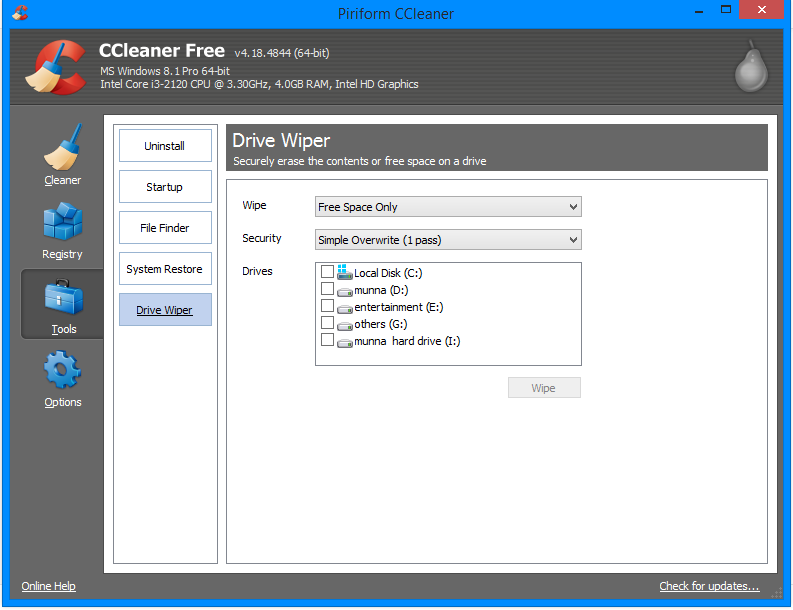
CCleaner 4.18.4844

CCleaner 4.18.4844


Probably the most popular freeware cleaner globally with over 1 billion downloads since its launch in 2003. Piriform’s CCleaner is a quick and easy to use program which makes your computer faster, more secure and more reliable. CCleaner removes cookies, temporary files and various other unused data that clogs up your operating system. This frees up valuable hard disk space allowing your system to run faster. Removing this data also protects your anonymity meaning you can browse online more securely. The built in Registry Cleaner fixes errors and broken settings to make your computer more stable. The simple, intuitive UI and rapid but powerful cleaning make CCleaner a favourite among novices and techies alike. Professional, Network, Business and Technician Editions of CCleaner are also available for serious users.


A Faster Computer

Browsing the internet your computer picks up a whole host of unnecessary files, cookies and history. The same thing happens when you run most programs on your computer – lots of temporary files and settings are saved. CCleaner removes these unused files and settings to free up valuable hard drive space, enabling your system to run faster. The default settings only focus on typical junk files and locations so you’re unlikely to lose important information unless you alter these. A Startup Cleaner also helps you to identify and remove unused programs running in the background when you start your computer. This makes the startup time shorter and puts less strain on your hard drive throughout use. 


Less Crashes & System Errors

If you notice lots of system freezes, error messages and often experience crashes, the chances are your registry become cluttered with unused files and broken settings. CCleaner’s fully featured Registry Cleaner identifies these issues and fixes them. The registry analysis takes seconds and cleaning just a little bit longer. Prompts advise you when to save backups to avoid losing important data.


More Secure Browsing

Advertisers and websites track your behaviour online with cookies. Saved passwords, cached data and internet histories make your identity less secure. CCleaner removes these files to make your browsing experience confidential, meaning you are less likely to suffer from identity theft and/or online fraud. The military grade Drive Wiper ensures any data you want to be permanently deleted, stays deleted.

Customisable Cleaning

CCleaner Tools and Options tabs allow you to customise cleaning options to fit your needs. If you are not a savvy user, you might want to stick with the safe default settings. Advanced users can uninstall unwanted programs, select which cookies to save, customise cleaning settings and setup system monitoring.


Summary

CCleaner has earned its position at the top of the freeware cleaners offering the sort of features premium programs struggle to compete with. The clean, intuitive UI makes it one of the easiest programs to use, but don’t let its size and simplicity fool you. This is a powerful utility for improving your computers performance. Piriform’s regular update process means CCleaner is constantly improving and its popularity will continue to grow.

DOWNLOAD :CLICK HERE

Saturday, September 27, 2014

iOS 8


iOS 8 DOWNLOAD LINKS ARE HERE


At long last, after many long weeks of waiting, iOS 8 download has arrived. While we have heard plenty about what is on iOS 8, and while some have experienced it in beta form, it isn’t quite the same thing as seeing the real deal.


We have the download links for you, right here, for every iPhone, iPod and iPod Touch model that is supported but, before you download it let’s just recap what we can expect to see in the way of new features:

Continuity

A brand new feature and a way of connecting your iOS device and Macs. AirDrop now works on both and a new feature called HandOff allows users to start something on one device and finish it on another one, as long as it connected to the same network. Users will also be able to pick up SMS and send them using their iPad or Mac if it is connected to their iPhone.

Notification Center

Apple has revamped the Notification Center and now new notifications can be actioned from within the Notification screen, instead of having to go in the corresponding app.

Keyboards

Predictive texting has undergone a major change with Quick Type and the addition of access to third party keyboards.

Health & Fitness

Health Kit is a new app that collects all your health and fitness data and allows you to track things like your blood pressure, pulse, heart rate, sleep patterns, calories burned, etc. The iPhone 6, iPhone 6 Plus and Apple Watch all contain many more sensors for this purpose and work in conjunction with one another.

Other Features

Other features include iCloud Photo Library, Widgets and Family Sharing. We could not possibly go into detail about everything here so download it and see for yourselves; and let us know if you find new features that haven’t been publicized.

How to Install IPSW Files :
The complete tutorial step by step to download ios 8 for your iPhone is given here in this blog post [iOS 8 Installation] . Read how to install IPSW files using iTunes .


iOS 8 IPSW Download links :

Monday, September 22, 2014

Open Adf.ly Links In India

How To Open Adf.ly Links In India And Other Blocked Countries


You know what is Adf.ly. It is a URL Shortener service which pays for every visit your URL gets. It became so popular in only few days and everyone in the world started to use it to earn some decent bucks. But unfortunately it is blocked in India and some other countries. If you are living in india, you may be familiar with this problem because nowadays most of the outgoing download links are from adf.ly. Anyway it is not at all a problem now. I figured out something which allows you to open the links.
If you want to go to adf.y, then you are blocked (let it be adf.ly/xxxx)
Just ad v2 in front of adf.ly (v2.adf.ly/xxxx)

Now go to v2.adf.ly and continue your service.
Update: If adding v2 is not working then try adding https:// instead of http://. 
Your Old Link – http://adf.ly/xxxx
Your New Link – https://adf.ly/xxxx
Note: When bypassing the links from above sites, Remove https:// and replace it with http://..

Saturday, September 13, 2014

Addmefast Bot - 100% Working

Free Addmefast Bot - 100% Working


100% Working Addmefast Bot---Autoclicker For Earn Unlimited Points.


Download:-

1. If you haven't Mozilla Firefox , Download it first. (Click Here To Download)

2. Download Imacros Firefox Extensions.(Click Here To Download)

3.Download Imacros Script.(Mediafire Link)

   FB Like Script(Click Here To Download)
   
   ALL SCRIPTS 


How To Use It

1. Install Mozilla Firefox.

2.Open Firefox & Goto Tools > Options > Content  > REMOVE TICK - Load images automatically

3.Install Imacros Extension

4.Now Copy Downloaded "FB Like Script" & "FB Share Script" To "My Document > Imacros > Macros"

5.Now Restart Firefox.

6.Go To http://addmefast.com/ & Log In To You Account

7.Now Click Imacros Icon In The Firefox Toolbar.(After This Step You Show Window In the Left Side)

8.Now Click "AddMeFastFB share.js" Or "AddMeFastFBlikes.js" (Its Show In The Left Of Screen)

9.Now Click Play

10.Now Come Small Window.Input Higher Number For It.

11.Now Points Are Earning.

Now Enjoy...........

Tuesday, August 19, 2014

Mobile Top Up Code Generator 2014

Mobile Top Up Code Generator 2014


  I Don't give Survey because I hate surveys

DUE TO HEAVY TRAFFIC I HAVE UPLOADED  THE TOOL TO THESE SERVERS

Download links : server1  , server 2 , server 3

This recharge code generator works in India , France, Us, Japan , Germany

Supported Mobile Networks :

VODAFONE
O2
THREE 
ORANGE 
VIRGIN
TESCO MOBILE
ASDA MOBILE
AT&T/CINGULAR 


DISCLAIMER : i am not responsible for the working of this software and any issues related with it


By:

raghav

-=[Follow Me]=-

Facebook : https://www.facebook.com/raghav.munna

Wednesday, August 13, 2014

ROOT NOKIA X, X+, XL

ROOT NOKIA X,XL,X+ AND INSTALL GOOGLE PLAY

NOKIA AT LAST UNDERSTOOD THE ADVANTAGE OF MANUFACTURING
 ANDROID SMARTPHONES AND CAME OUT WITH THE NOKIA X SERIES,
STARTING FROM NOKIA X—NOKIA X+—NOKIA XL. THESE THREE

SMARTPHONES ARE EQUIPPED WITH THE GOOGLE’S OPEN-SOURCE 
PROJECT ‘ANDROID’ ALTHOUGH THE INTERFACE OF THE DEVICES
 ARE LAYERED WITH NOKIA’S INTERFACE BUT THE BACKGROUND 
STUFF IS ALL BASED UPON LINUX(MOTHER OF ANDROID). NOKIA DID
 LAUNCH ANDROID SMARTPHONES BUT DUE TO A CONTRACT WITH
 MICROSOFT, NOKIA MISSED GOOGLE PLAY STORE. THE EXISTING
 NOKIA STORE IN THE X-SERIES IS ONLY OFFERING A LIMITED ANDROID 
APPS BUT YOU DON’T NEED TO WORRY ABOUT THAT CAUSE TODAY
 I AM GOING TO TELL YOU HOW TO ROOT NOKIA X, X+, XL AND INSTALL GOOGLE STORE.
SO LET US BEGAN WITH ROOTING AND INSTALL PLAY STORE IN NOKIA SERIES. NOTE THAT ROOTING MIGHT VOID YOUR WARRANTY & THIS GUIDE IS 100% TESTED BUT MAKE SURE YOU DO IT ON YOUR OWN RISK!


REQUIREMENTS:
  1. At least 60% charged phone.
  2. Enable USB Debugging from Phone Settings>> Developers Options.
  3. Also do not forget to check allow installations from “Unknown Sources” which is available within Settings tab.
  4. Back-up all your data.
  5. Download required files.

How to root Nokia X, X+, XL:
  1. Download Framaroot from the link above and install it in your phone.(make sure you enabled ‘unknown sources’ available within setting tab).
  2. Once the installation is complete open Framaroot app, you will be prompted with several options just choose ‘install super su’ and than tap on ‘Gandalf’.Root-Nokia-X
  3. Now you will be prompted with a message saying ”superuser and su binary installed” Simply click ok and Reboot your device.
  4. Once the device will reboot you will have root access .

How to install Google Play Store on Nokia X, X+, XL:
  1. Download and extract Nokia X-Gapps pakkage and place it in your phone.
  2. Install Root Explorer App from the link above.
  3. Once installed open it and give it root access.
  4. Now Copy the extracted apk files to /System/App and change files permissions like this:Root-explorer
  5. Once you have done as above picture simply click ok and Reboot your Device.
  6. After the Reboot Playstore should have been successfully installed on your Nokia X.
  7.  Now open Google Play Store and it should be working perfect! First it will ask you for Google Account, just enter your email and password and enjoy with Playstore’s million’s of free Apps!


IF U GET ANY PROBLEMS OF INSTALLING FEEL FREE TO ASK ME 


Downloads adda.com Downloadsadda © 2014. All Rights Reserved | Powered by-Blogger